Create Customizable Printable Grids with Adobe Illustrator
Getting Started with Grid Creation
Adobe Illustrator is a powerful tool for creating various types of designs, including printable grids. Whether you need grids for graphing, drawing, or other purposes, Illustrator provides the features to make it happen. To start making printable grids, you'll need to have Adobe Illustrator installed on your computer. If you haven't already, download and install the software, then launch it to begin your project.
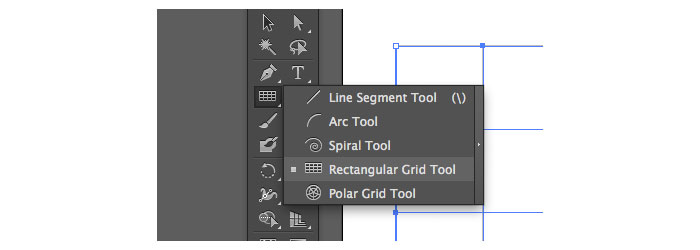
To create a grid, start by setting up your document. Go to 'File' > 'New' and choose the dimensions and settings suitable for your grid. You can select from various preset options or customize the settings according to your needs. Once your document is set up, you can use the 'Rectangular Grid' tool to create your grid. This tool allows you to specify the number of rows and columns, as well as the spacing between them.
Customizing Your Grids for Printing
When creating your grid, consider the purpose it will serve. If you're making a grid for graphing, you may want to use a finer grid with more rows and columns. On the other hand, if you're creating a grid for drawing or sketching, a coarser grid with fewer rows and columns might be more suitable. You can also customize the appearance of your grid by changing the line color, thickness, and style.
After you've created your grid, you can customize it further to suit your printing needs. You can adjust the size, resolution, and color mode to ensure that your grid prints clearly and accurately. Additionally, you can add other design elements, such as text or images, to enhance the functionality and appearance of your grid. Once you're satisfied with your design, save it as a PDF or print it directly from Illustrator.